
Appearance
Roles and permissions
Who this is for: Admins inviting users; anyone wondering why a button is missing
What you'll achieve: Match people to the right role for their job
Person vs user
| Concept | Meaning |
|---|---|
| Person | Someone who can appear on the rota (staff directory) |
| User | Someone who can sign in |
A person does not need a login. A user invite creates a login and assigns a role. For My schedule, the user must be linked to a person (person_id).
Linking is automatic when possible: SCIM/SSO match by IdP external id or email to the staff directory; Admin invite can pick a person or auto-match; staff CSV import back-links users with the same email.
Roles
| Role | Typical school job |
|---|---|
| Tenant owner | Head of school / system owner for the tenant |
| Admin | Office manager configuring the school (setup, invites, publish) |
| Duty lead | Designated rota person - publishes the day, records absences, runs cover |
| Office | Reception / cover desk recording absences |
| Staff | Teachers and support staff (login optional) |
| Viewer | Read-only export access |
Designated rota person
SchoolRota works best when one person (or a small pair) owns publishing. Invite them as Duty lead during setup. Other staff mainly receive the published PDF rota and calendar updates - they do not need admin access.
Site-scoped access (Phase 9)
Multi-site trusts will add site-scoped access via user_site_access: the same role slugs (admin, duty_lead, …) scoped to one school site. Trust-wide admins keep tenant-level admin or tenant_owner. See docs/MULTI_SITE_AND_ORGS.md.
Permission summary
| Capability | Owner | Admin | Duty lead | Office | Staff | Viewer |
|---|---|---|---|---|---|---|
| Manage setup / staff / commitments | ✓ | ✓ | ||||
| Import staff | ✓ | ✓ | ||||
| Build & publish rota | ✓ | ✓ | ✓ | |||
| Request a rota change | ✓ | ✓ | ✓ | ✓ | ✓ | |
| Record absences | ✓ | ✓ | ✓ | ✓ | ||
| Configure notifications | ✓ | ✓ | ||||
| View analytics | ✓ | ✓ | ✓ | ✓ | ||
| Create exports | ✓ | ✓ | ✓ | ✓ | ✓ | |
| Invite users | ✓ | ✓ | ||||
| Use AI assistant | ✓ | ✓ | ✓ | |||
| Configure SSO | ✓ | |||||
| Configure SCIM | ✓ | |||||
| Configure Outlook calendar | ✓ | ✓ | ||||
| Configure Microsoft profile photos | ✓ | ✓ | ||||
| View audit log | ✓ | ✓ | ||||
| Send Help & ideas | ✓ | ✓ | ✓ | ✓ | ✓ | ✓ |
Microsoft profile photos use the same permission as Outlook (integrations.outlook.configure). See Microsoft profile photos.
For the full matrix, see RBAC matrix.
Inviting users
- Open Admin, or use Setup → Rota person during onboarding.
- Enter email, temporary password (setup auto-generates one), and role.
- Select Invite.
- Share the portal URL and credentials securely if email is delayed.
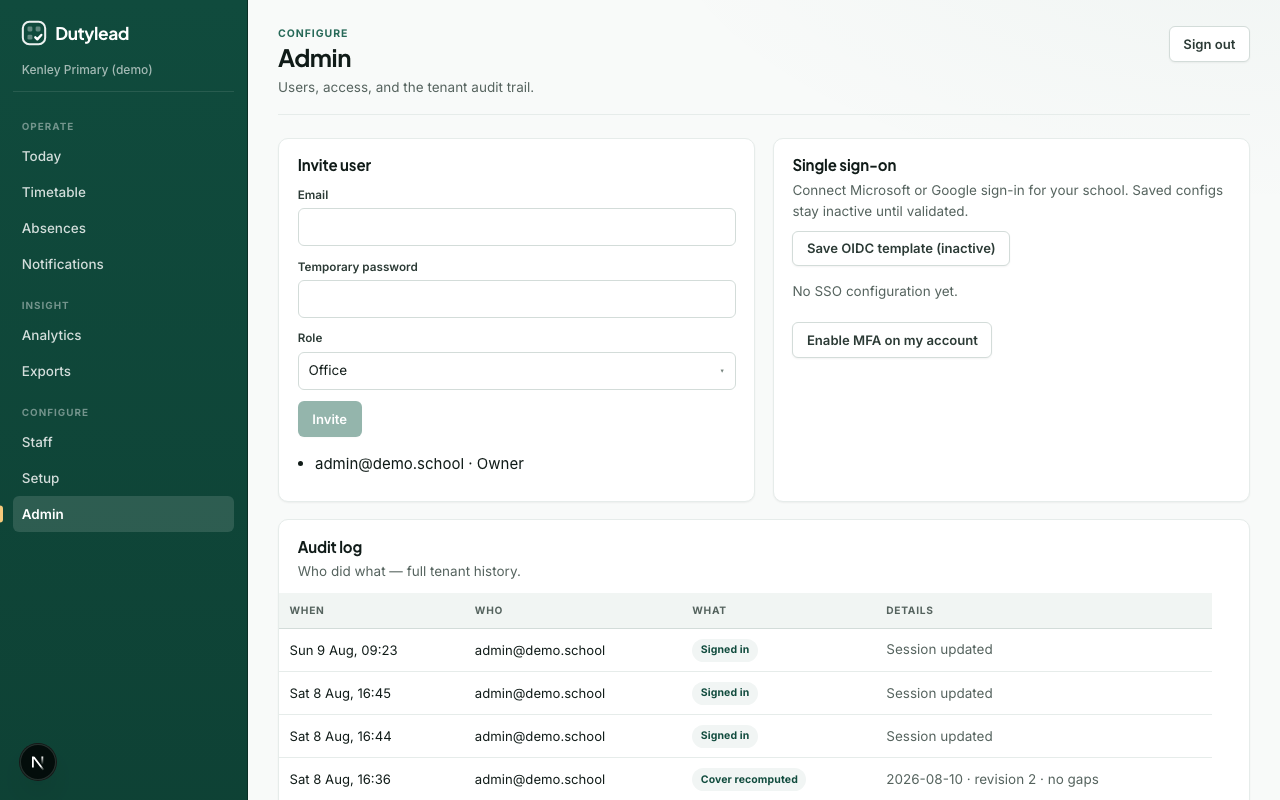
Requires role
Admin or Tenant owner (user.invite)
What happens next
Navigation by role
The sidebar only shows areas your role can use. Staff see My schedule, Missed work, Notifications, and Account. Viewers also get Today, Timetable, and Exports. Office and duty leads get absences, missed work, and analytics. Duty leads also see Rota requests. Admins and owners also see Staff, Setup, and Admin.
Staff cannot open school-wide Today or Timetable by URL either. Those boards stay with cover and ops roles. The same rule applies to the board APIs.