
Appearance
Weekly blocks
Who this is for: Admin, Tenant owner
What you'll achieve: Record recurring teaching and cover blocks so the timetable shows who is already booked
Requires role
config.manage. Tenant owner or Admin
Before you begin
People must exist in the staff directory.
Lunch breaks
Create as many lunch breaks as you need. Each one is either:
- A fixed break: everyone assigned gets the same time (for example
12:00–13:00). - A flexible window: a longer sitting (for example
11:00–14:00) where each assigned person gets a short break (usually 30 minutes) inside it. Optionally set Most people on break at once so rebuild will not stack too many breaks on the same half hour.
Only staff you assign to a lunch break appear as on lunch on the timetable. Staff with no lunch break stay available. The setup screen highlights who is still unassigned.
You can set these on Setup → Staff lunches, or later on Staff → Weekly blocks.
- Open Staff → Weekly blocks, or stay on the setup step.
- Choose New lunch break, pick fixed or flexible, set the times and days, and optionally name it.
- Tick the people who take that break, then save.
- Repeat for another group if needed. Each person also has a dropdown so you can move them to another break or None.
Click a saved lunch break to select everyone on it, then change the times and save again. Rebuild the day or week so allocated flexible breaks appear on the board. Halves you create with Split session stay one sitting, so the same person is not used on both halves. Two separate times on the same duty area stay independent unless you split them. On a later, different lunch post, Often cover who are free are used again before Sometimes. Rebuild tries several legal layouts (cover first, reserved breaks first, moving an Often break to another time in lunchtime, then a few swaps) and keeps the one that covers lunch posts and assigned breaks best. A fixed sitting is the usual time, not a lock for that day, if moving it lets Often cover instead of Sometimes. If nobody can cover a post without taking someone's break, they stay on the post and the timetable notes that they had no lunch break.
The engine will not place someone on an overlapping post. If they are already on a post in that window, they stay there. The duty shows On lunch break. Rebuild takes them off. Or leave them (and confirm if you assign them again) when they must miss this break to cover. Chat needs the same confirmation (allowLunchBreakClash).
To move one allocated break on the timetable for a single day, use Change on that lunch block (or chat override_day_lunch_break). Use Remove (or chat "take off their lunch") to take that day's break off. Rebuild will not put a removed day lunch back. A warning appears if the new time overlaps their own duties, lessons, or weekly blocks.
Chat can list the current windows and today's allocated breaks (list_lunch_breaks) and apply or clear a group (apply_lunch_breaks) by name or grade (for example the TAs). Spoken names still match (Paul Hills finds Paul Hill). Do not copy pupil lunch or lunch-duty times unless those really are the staff break.
Staggered example: KS1 staff on a fixed break 11:45–12:15, KS2 staff on 12:15–12:45. Overlapping windows are fine. These are staff breaks, not pupil sittings. For KS1 then KS2 children's lunch cover, add two times on the dining hall or playground post. See Initial setup, Day structure.
Rebuild the week afterwards if duty boards are already live.
What weekly blocks are for
Weekly blocks capture recurring activities such as:
- Phonics / intervention
- Class cover
- PPA
- Meetings
- Nest / other specialist blocks
They appear on Timetable alongside duties so duty leads can see conflicts at a glance.
Steps
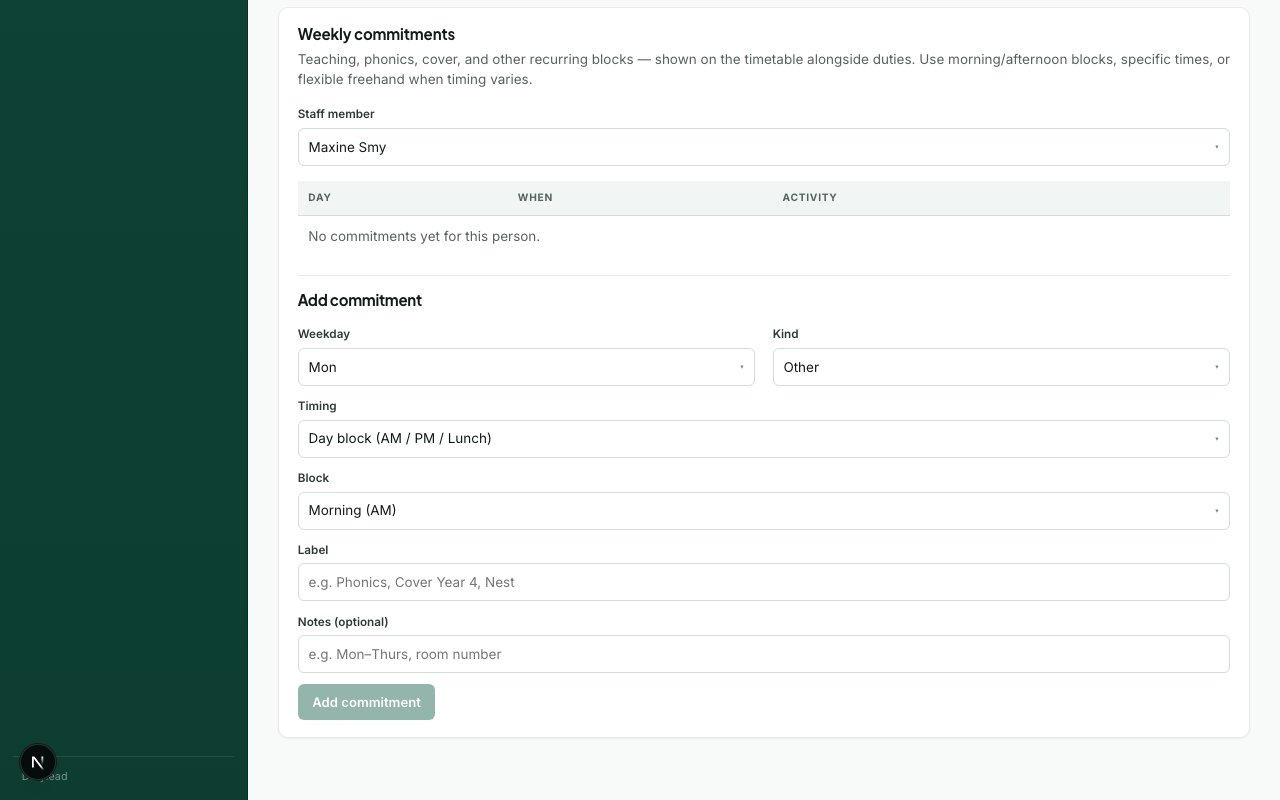
- Open Staff → Weekly blocks (
?tab=commitments) and select a person (or open weekly blocks from the Timetable person card if available). - Open Add a weekly block if it is closed, then add:
- Kind (phonics, intervention, class cover, PPA, meeting, nest, other)
- Day of week
- Timing. AM/PM/lunch block, specific times, or freehand
- Save.
- Open Timetable and confirm the block appears in the by-person view or timeline.
You can also edit weekly blocks inline on person cards when you have config.manage. Add commitment on Timetable can also add a duty session or a lunch break for that day only. Those need a confirmed manual override so rebuild does not undo them.
What happens next
Troubleshooting
| Problem | What to try |
|---|---|
| Weekly block not visible | Check the Timetable filters (staff member / activity type) |
| Wrong day | Confirm weekday and week picker on Timetable |