
Appearance
Importing staff
Who this is for: Admin, Tenant owner
What you'll achieve: Bulk-load people from CSV or Excel with correct cover preference
Requires role
staff.import. Tenant owner or Admin
Before you begin
- Press Download staff template in Setup (AI setup or Staff directory) or on the Staff page (also
templates/staff.csvin the repo) - Decide cover preference for each person
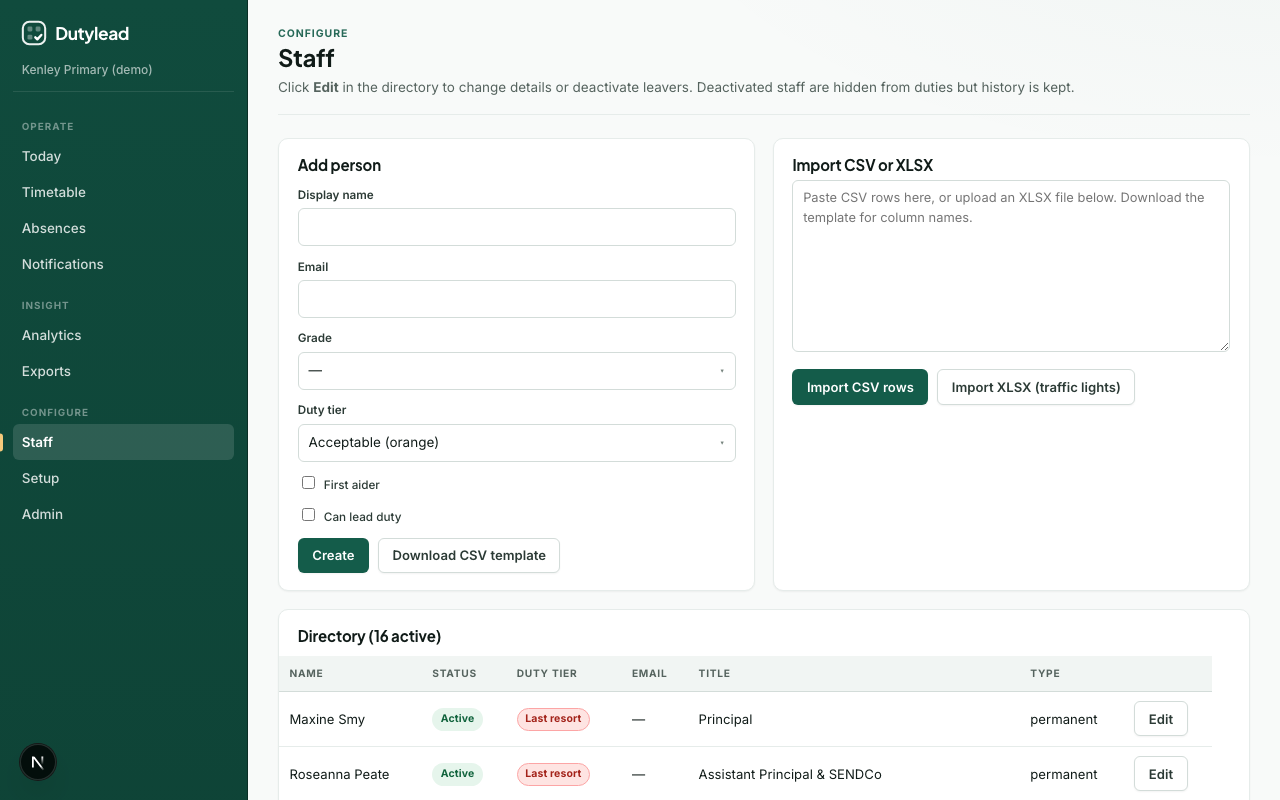
CSV import
Columns
| Column | Required | Notes |
|---|---|---|
| Name | Yes | Display name |
| No | Contact / matching | |
| Role | No | Job title label. Office/reception titles (e.g. Receptionist, Admissions Officer) default to Only if needed when Cover preference is blank |
| Cover preference | Recommended | Often, Sometimes, Only if needed, or Never (legacy: preferred, acceptable, last_resort, excluded) |
| First aider | No | true / false |
Example:
csv
Name,Email,Role,Cover preference,First aider
Alex Example,alex@school.test,Teaching Assistant,Often,true
Sam Example,sam@school.test,Class Teacher,Only if needed,false
Steps
- Open Staff.
- Download the CSV template if needed.
- Paste CSV rows into the import area (or follow the on-page paste flow).
- Review validation messages.
- Confirm the import.
On a trust, matching names already in the organisation are attached to the school you have selected, not created twice. The confirm button says what will happen, for example Commit 2 new, attach 3 existing, and the summary afterwards counts both: importing the same list on a second school reports 0 new and attaches everyone. People already at this school are counted as neither, so re-running an import does not inflate the numbers. Existing grades and cover preferences are left as they are.
XLSX import (spreadsheet colours)
SchoolRota can parse Kenley-style spreadsheets where cover preference is encoded as cell fill colour rather than a text column.
Typical colour mapping:
| Colour cue | Cover preference |
|---|---|
| Green | Often |
| Amber | Sometimes |
| Red | Only if needed or Never (per parser rules) |
Exact mapping follows the domain helpers (dutyTierFromFillRgb / dutyTierFromLabel). Prefer an explicit Cover preference column in CSV when you control the file format.
Steps
- Open Staff.
- Upload the
.xlsxfile. - Review parsed rows and tiers.
- Confirm the import.
Names read from a duty rota
When names come from a duty rota or from a pack of personal timetables (Setup → Existing timetable), they often carry extra wording. The import separates the person from that wording:
- A day qualifier limits the duty instead of becoming part of the name.
Rosie Thursis imported as Rosie, on duty Thursday only. - Supply cover collapses to one placeholder.
Supply,Supply TA, andSupply teaching assistantall become Supply TA, which you can assign like any other person. - A job description is never turned into a person.
DW Learning CoachandOffice Staffname a post, not an individual, so the duty is left for you to assign from the directory. - A missing separator is repaired only when the rota proves the split elsewhere.
Katie, Adam Michaela Cbecomes Katie, Adam, and Michaela C because other days list each of them separately. A name the rota only ever writes as one piece is left alone.
After import
- Spot-check a few people in the directory - especially office roles (should be Only if needed unless you set otherwise) and TAs (should be Often when inferred).
- Assign leads on the weekly template in Initial setup. After the staff list, you can upload one whole-school duty rota or many personal timetable files on Existing timetable.
- Optionally add weekly blocks.
What happens next
Troubleshooting
| Problem | What to try |
|---|---|
| Tiers all default | Check column header spelling or XLSX fill colours |
| Duplicate names | Prefer unique emails; clean the sheet before re-import |
| Empty import | Ensure a header row and at least one data row |
| A duty has nobody on it | The rota named a post such as DW Learning Coach. Assign the person who covers it |
| A name still looks wrong | Edit it in the directory. The rota cell likely spelled it differently from the staff list |