
Appearance
Staff directory
Who this is for: Admin, Tenant owner
What you'll achieve: Add, edit, and deactivate people on the rota
Requires role
config.manage. Tenant owner or Admin
Before you begin
School grades should exist for assignment (complete Grades and cover order if you have not).
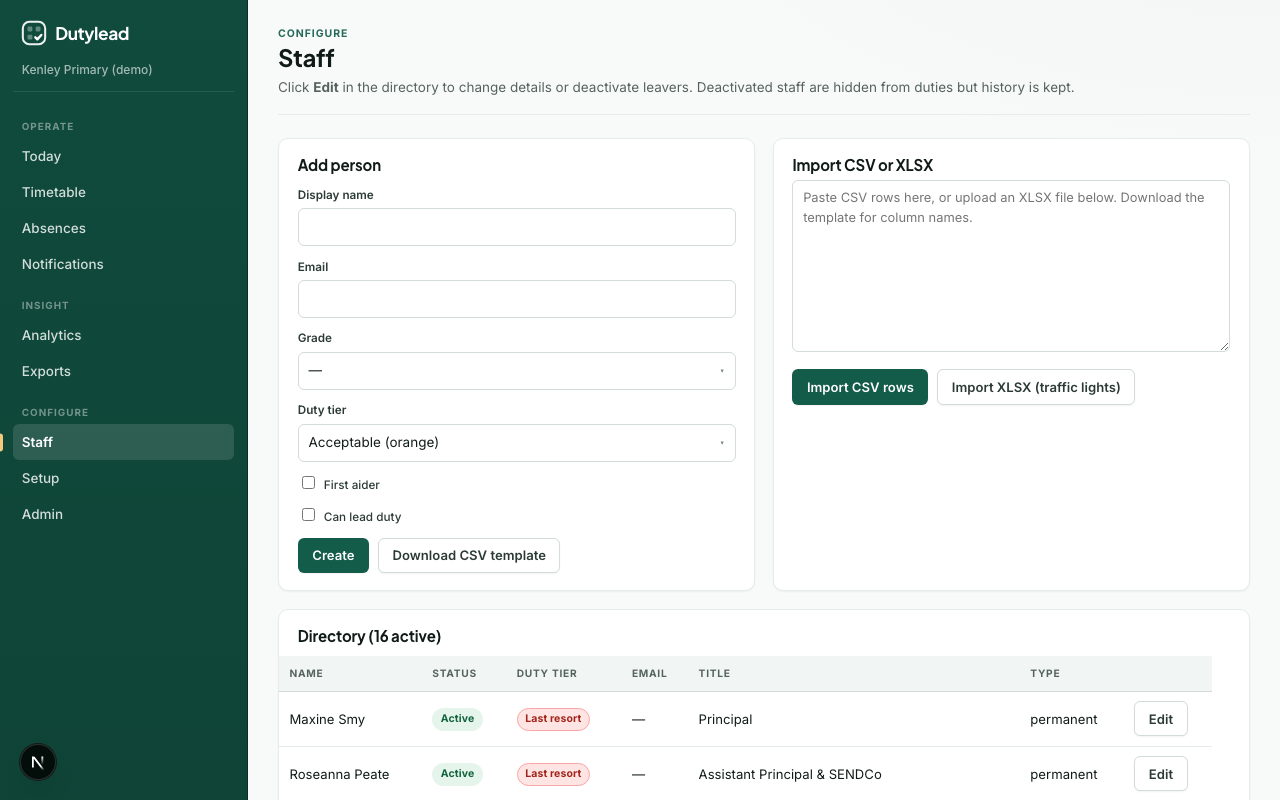
Trusts: assign people to a school
Staff live once in the organisation. The directory on each school only shows people assigned there.
- Open Staff while that school is selected in the sidebar.
- Use Add from another school to attach existing people, or add someone new (they join this school).
- On Edit, use Schools they work at to add or remove schools, and optionally tick Supply pool.
Finding the right person
Add from another school lists everyone in the organisation who is not here yet. Once there are more than a handful, a Search people box appears: type any part of a name, email address, or job title, for example teaching assistant to see every TA. When people work at several other schools you also get an Add from menu to list only the people at one of those schools. Long lists show the first 25 people with a Show more button.
Share them or move them
When you add someone decides what happens to the school they came from:
| Choice | What happens |
|---|---|
| Share them | They work here and keep their other schools. Use this for staff who cover more than one school. |
| Move them here | They join this school and come off the school they came from, so they appear on one rota. |
A move carries their cover preference, duty eligibility, supply pool tick, and home school status across. Grades belong to a single school, so set their grade here afterwards. This week's already-built boards at both schools rebuild so they leave the old rota and can be placed on the new one.
If someone works at several other schools, pick the school to move them from in Add from first: without that there is no way to tell which one they should leave, so the button stays disabled.
Importing the same spreadsheet on a second school attaches matching names there instead of creating duplicates. The import summary tells you how many people were created and how many were attached, so a list where everyone already exists reports 0 new and attaches them all. Existing grades and cover preferences are left as they are; the import only adds the school.
The page starts on the Directory list. Extra work stays folded away until you need it:
- Add or import opens the new-person form and spreadsheet import
- Add from another school (trusts) starts closed once people are already on this school
- Edit opens a panel beside the directory (name, email, title, grade, and cover preference first). Skills, working hours, leave, and privacy sit under Show. Save stays at the bottom of the panel.
- Teaching and Weekly blocks are separate tabs (
?tab=teachingor?tab=commitmentsin the address bar). Weekly blocks includes Lunch breaks so you can apply the same unavailable window to several people at once. You can also set those windows on Setup → Staff lunches after the directory exists.
Add a person
- Open Staff.
- Select Add or import.
- Fill in Display name, optional Email, Grade, and Cover preference.
- Tick skills that apply (First aider, Can lead duty, Can cover class, or any skill you add).
- Save the new person.
To limit who may cover a specific post, tick the matching skill on those people, then require that skill on the duty session (Day structure cover rules). Cover will not propose anyone without that skill, and every person on the session must hold it. Rebuild releases pinned people on that session who do not have the skill.
Cover preference: Often, Sometimes, Only if needed, Never. See Key concepts.
Office and reception job titles (for example Receptionist, Admissions Officer, Attendance Officer) import as Only if needed when no cover preference is set, so support staff stay first in the cover pool. You can still override any person to Often / Never on Edit.
One-day supply teachers
For supply or agency cover on specific days only, use Book supply on Today or Absences. Add their name and book the day there. Do not create them in the staff directory.
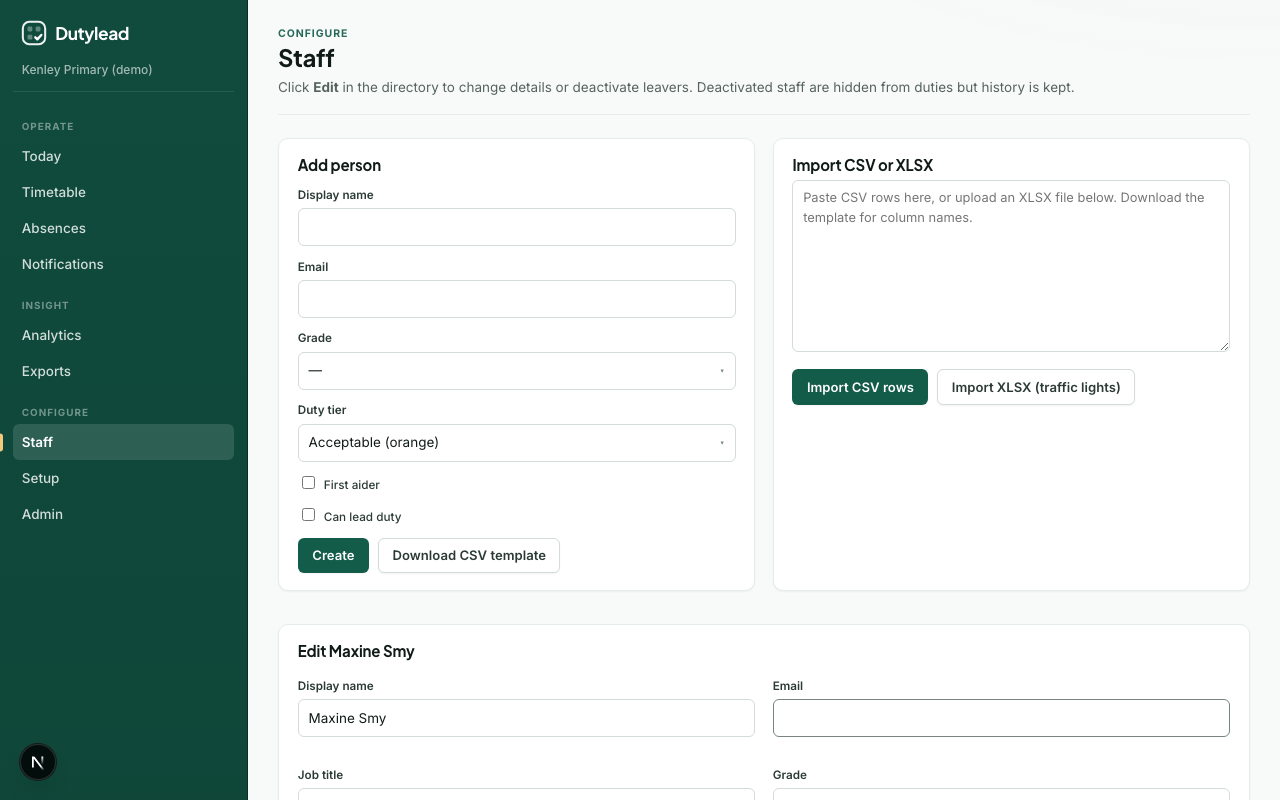
Edit details
- In the directory, select a name or Edit. A panel opens on the right; the list stays where it is.
- Update fields as needed.
- Save at the bottom of the panel.
On a phone the panel covers the list. Close it, tap the dimmed area, or press Escape to go back.
Cover preference is stored for the school you have open. Rebuild and the timetable use that school copy, not only the organisation-wide profile. If you change it in chat, say yes when asked to rebuild this week's rota. Otherwise use Save & update rotas here, or Build week / Rebuild day on Timetable.
When you change Cover preference, Grade, or Skills, extra buttons appear:
| Button | What it does |
|---|---|
| Save changes | Saves the profile only |
| Save & update rotas | Saves and recomputes prepared duty boards from today to the end of this school week (or next week if today is after the last school day) |
| Save, update & publish | Same as above, then publishes every updated day (requires rota.publish) |
After Save & update rotas, a draft is ready. Review any unfilled posts, then Publish now (publishes all recomputed days) or open Today to check the board before going live.
Working days & hours
On Edit, open Working days and hours to set when someone is available for cover:
| Setting | Use |
|---|---|
| Works? per weekday | Turn off days they do not work (e.g. no Fridays) |
| Full day | Available for the whole school day |
| Mornings only / Afternoons only | Part-time availability |
| Custom times | Specific from/to times |
The cover engine respects these windows when proposing assignments. This is separate from weekly commitments (recurring teaching blocks).
When days or hours change, use Save & update rotas (or Save, update & publish) so prepared duty boards for the rest of this week pick up the new availability.
Long-term leave
For extended absence (maternity, sabbatical, long-term sick leave), open Long-term leave on the same edit screen, not the day-level Absences page.
- Open Edit for the person, then Long-term leave.
- Set From date and either an Until date or Open-ended (no return date yet).
- Add optional Notes (e.g. “Maternity leave”).
- Select Record leave.
While leave is active, the person is excluded from cover for every day in the range. Cover recomputes for affected days. Select End leave when they return.
Absence vs long-term leave
Absences (Operate → Absences) are for single days or short periods and trigger same-day cover. Long-term leave is for weeks or months and keeps someone out of the pool until you end leave.
Deactivate leavers
- Open Edit for the person.
- Confirm deactivation when prompted.
They are removed from the duty pool, teaching timetable, and weekly blocks, and hidden from the staff directory.
History preserved
Deactivated staff are hidden from the live timetable, but historical duty assignments remain for audit and reporting. Reactivating restores their teaching lessons; duty posts and weekly blocks need assigning again.
GDPR: export personal data
Tenant owners and admins can download a JSON bundle of one person’s SchoolRota data (profile, assignments, absences, commitments, notification history, and related records).
- Open Staff.
- Select Edit on the person, then Export or erase personal data.
- Choose Export data (JSON).
- Save the file securely and share only with the data subject or your DPO process.
This supports subject access requests. It does not remove data from SchoolRota.
GDPR: erase personal data
When someone must be removed from processing (e.g. erasure request), use Erase personal data on their staff record.
- Open Edit for the person, then Export or erase personal data.
- Select Erase personal data.
- Type the person’s display name exactly to confirm.
After erasure:
- The profile is anonymised (
Erased staff member); email and identifiers are cleared. - Linked login, MFA, calendar links, supply bookings, and template assignments are removed or anonymised.
- The person cannot be reactivated or edited back to a named profile.
- Historical duty rows may remain anonymised for operational audit.
- The tenant owner account cannot be erased - transfer ownership first.
All erasures are audit-logged.
Import many people at once
Use Importing staff for CSV paste or XLSX upload.
Weekly commitments
Recurring teaching and cover blocks are managed per person: see Weekly commitments.
Microsoft 365 schools can show Entra profile photos instead of initials once access is set up. See Microsoft profile photos.
What happens next
Troubleshooting
| Problem | What to try |
|---|---|
| Person still on the live duty board after deactivate | Open Today, Timetable, Setup, or Analytics for that week. Boards, week review, and duty load drop leavers when they load. Rebuild the day if a post is then short. |
| Person missing from this school's directory | They may only be assigned to another school. Open Staff and use Add from another school, or Edit them and add this school |
| Person missing from template assign list | Confirm they are active, not erased, and assigned to this school |
| Moved someone to the wrong school | Add them back the same way: select their new school, choose Move them here, and move them from the school you moved them to |
| Move them here button disabled | They work at more than one other school. Choose the school to move them from in Add from |
| Cannot reactivate after erasure | Erasure is permanent; add a new person if they return |
| Export button missing | You need admin/owner access; erased profiles have no export |
| Wrong grade options | Complete setup basics / seed grades for the tenant |
| Person still on cover while on leave | Confirm long-term leave is recorded on Staff → Edit, not only a day absence |
| Part-time staff assigned outside hours | Set working days & hours on their staff record |